Creating Effective Cut Sheets


A cut sheet is a detailed document. It shows the specifications for a project. It gives important information like sizes, materials, and cutting steps. You can use cut sheets in many areas. These include construction and graphic design. Clarity and organization are very important in these documents. When you present information clearly, it helps people use it better. This also lowers mistakes in your projects.
Key Takeaways
A cut sheet is important for giving clear details. It helps to prevent mistakes in projects.
Use simple words and good layout to make it easy to read.
Update cut sheets often to keep all information correct and helpful.
Get feedback from users to make cut sheets better and meet their needs.
Focus on important details and avoid too much information. This keeps things clear and prevents confusion.
CUT SHEET DEFINITION
A cut sheet is an important document in many fields. It gives detailed information for a project. You can think of it like a blueprint that shows what you need to know about materials and steps.
In construction and engineering, a cut sheet has special uses. Here’s a clear definition based on the field:
Context | Definition |
|---|---|
Construction | A paper that gives key details about a product or material used in a building project. It includes things like size, type of material, and how it should work. |
Engineering | A technical paper that has detailed facts about the specifications, performance, and features of a certain piece of equipment or material. |
Knowing how important cut sheets are can help you avoid mistakes in your work. They are very helpful in cutting down errors and redo work. Here are some ways cut sheets help projects succeed:
Ensures Accurate Specification and Compliance: Cut sheets give detailed technical facts, making sure materials meet project needs and follow rules.
Streamlines Communication: They act as a shared reference for everyone involved, cutting down confusion.
Facilitates Approval Processes: Cut sheets let you check and approve materials before buying, stopping costly errors.
Supports Installation Accuracy: They help installation teams, reducing mistakes and delays.
Improves Quality Control: Project managers check materials against cut sheets to ensure they match specifications, keeping quality high.
Aids in Cost Management: Correct specifications stop ordering mistakes, saving money.
Supports Maintenance and Future Upgrades: Keeping cut sheets gives important details for future fixes or upgrades.
By using cut sheets well, you can make your projects clearer and better organized, leading to great results.
CUT SHEET COMPONENTS

To make a good cut sheet, you need to include important parts. These parts give clear and simple information. Here are the main things to focus on:
Dimensions
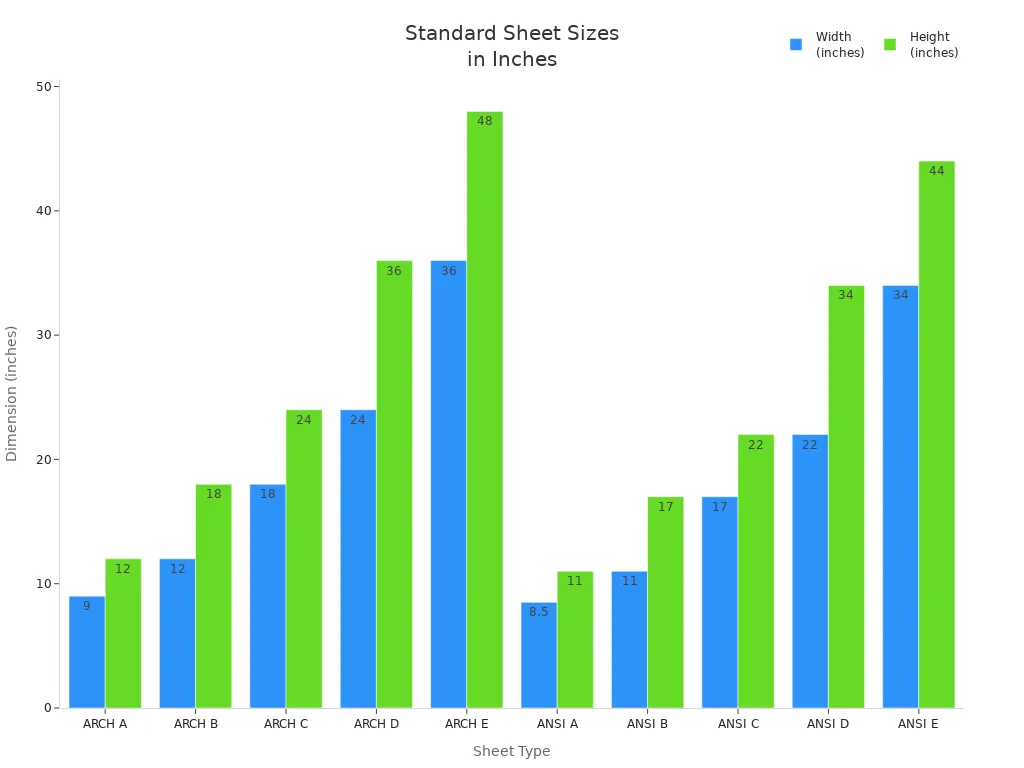
Dimensions are very important in a cut sheet. They tell you the size of materials and parts. Correct dimensions help you avoid mistakes when cutting. Here are some common dimensions used in building and engineering projects:
Type | Dimensions (inches) | Dimensions (millimeters) |
|---|---|---|
ARCH A | 9 x 12 | 228.6 x 304.8 |
ARCH B | 12 x 18 | 304.8 x 457.2 |
ARCH C | 18 x 24 | 457.2 x 609.6 |
ARCH D | 24 x 36 | 609.6 x 914.4 |
ARCH E | 36 x 48 | 914.4 x 1219.2 |
ANSI A | 8.5 x 11 | 215.9 x 279.4 |
ANSI B | 11 x 17 | 279.4 x 431.8 |
ANSI C | 17 x 22 | 431.8 x 558.8 |
ANSI D | 22 x 34 | 558.8 x 863.6 |
ANSI E | 34 x 44 | 863.6 x 1117.6 |
These dimensions help everyone on the project know the sizes needed. You can look at the chart below for a visual comparison of standard sizes for architectural and engineering sheets.
Materials
The materials listed in a cut sheet give important details for buying. You must say what types of materials you need for your project. This helps your team find the right products quickly. Here are some reasons why material details matter:
They help procurement teams find and buy materials well.
They make it easier to ask suppliers for quotes, so you can compare prices.
They let you check other materials if the first choice is not available or too expensive.
They ensure suppliers follow the standards that materials must meet.
By giving clear material details, you can keep quality and consistency in your project.
Cutting Instructions
Cutting instructions are key for making sure cuts are accurate. You should add clear steps that explain how to cut each material. Here are some industry tips for cutting instructions:
Keep minimum distances between features to ensure good cuts.
Change text to shapes for cutting, so holes in letters are supported.
Design notches and slots to match the kerf thickness, with rounded edges for cutting.
Use standard gauges for materials to avoid delays in getting them.
By following these tips, you can lower mistakes and improve the quality of your project.
TIPS FOR CLARITY

Plain Language
Using plain language in your cut sheets is very important. It helps you talk clearly with your audience. Readers like documents that use simple words and easy sentences. This makes it easier to understand and read quickly. Here are some good reasons to use plain language:
More people follow rules when documents are easy to read.
Organizations save money by using plain language programs.
Clear writing saves time and money. It helps readers respond better and avoids confusion. This helps all readers, including experts and those learning English. By using plain language, you make your project clearer and more trustworthy.
Formatting Techniques
Good formatting can really help how easy your cut sheets are to read. Here are some tips to think about:
Use Bullet Points: Bullet points break down complex information into smaller parts. They help readers quickly see the main ideas.
Incorporate Tables: Tables give a clear view of data. They allow side-by-side comparisons and show important details.
Choose Appropriate Fonts and Colors: Pick fonts and colors that look nice. Make sure the text is easy to read.
Utilize Whitespace: Whitespace helps guide the reader's focus and makes reading easier. It keeps the document from looking messy.
Headings and Subheadings: Use headings and subheadings to help readers find their way through your content easily.
By using these formatting tips, you can make cut sheets that are not only informative but also nice to look at. This clarity will help your audience understand the information better and lower the chances of mistakes.
COMMON MISTAKES
Overloading Information
A common mistake when making cut sheets is adding too much information. If you put in too many details, it can confuse the reader. This makes it hard for them to find the important information they need. Too much data can cause misunderstandings and errors.
To avoid this problem, focus on the most important details. Use clear and simple language. Highlight the information that matters most for the project. Here are some tips to keep your cut sheets clear:
Collaborate Early: Work with your fabricator during the design phase. Their advice can help you simplify the information.
Utilize Software: Use CAD tools to check designs. This helps find mistakes before production starts.
Standardize Features: Choose standard sizes and parts. This makes the fabrication process easier.
Prototype When Necessary: Make prototypes to spot design problems early.
Understand Your Fabricator’s Capabilities: Make sure your design matches what your fabricator can do.
By following these steps, you can create cut sheets that are helpful without being too much.
Lack of Visual Clarity
Another common problem is not having clear visuals. If your cut sheet is hard to read, it won’t work well. Things like glare and low contrast can make it tough for readers to understand the information. For example, light reflecting off shiny surfaces can make text hard to see. This can lead to mistakes and confusion.
To improve visual clarity, try these tips:
Use high contrast between text and background. This makes it easier to read and helps users understand graphics.
Avoid complicated or crowded layouts. Simple designs often make it easier to understand.
Use whitespace wisely. It helps guide the reader's attention and cuts down on clutter.
By fixing these visual clarity issues, you can greatly improve how useful your cut sheets are. Clear and organized documents lead to better project results and fewer errors.
BEST PRACTICES
Regular Updates
Keeping your cut sheets up to date is very important for your project. Regular updates make sure all information is correct and useful. Here are some key practices to follow:
Schedule Reviews: Set a regular time to check your cut sheets. This could be every month or every few months, based on your project needs.
Track Changes: Keep a record of changes made to each cut sheet. This helps you see what updates were needed and why.
Version Control: Use version control systems to manage different versions of your cut sheets. This stops confusion and makes sure everyone uses the latest version.
By using these practices, you can keep your cut sheets accurate and improve their usefulness.
Feedback Incorporation
User feedback is very important for making your cut sheets better. Getting ideas from users helps you find ways to improve. Here are good methods for collecting feedback:
Method | Description |
|---|---|
Surveys and questionnaires | Good for getting organized data from many users, focusing on specific insights. |
Usability testing | Watches users using the product to find problems. |
User interviews | Gives detailed insights into what users want and what frustrates them. |
Feedback forms | Simple forms for quick, direct feedback while the experience is fresh. |
Live chat and chatbots | Collects immediate feedback during user interactions. |
Heatmaps and analytics | Shows user behavior to find patterns and usability problems. |
Focus groups | Encourages discussion among users to share ideas or test designs. |
Customer support interactions | Looks at support tickets to find common user issues. |
Online reviews and social media | Watches unfiltered feedback from users, showing trends and comparisons with competitors. |
Live website testing | Records user actions and thoughts to find hidden usability problems. |
Using feedback helps you improve your cut sheets. It makes sure they meet user needs and boost project results. By actively seeking and using user ideas, you create cut sheets that are not only useful but also easy to use.
Making good cut sheets is very important for your project to succeed. You need to pay attention to being clear, organized, and accurate. Here are some important points to keep in mind:
Understand your audience to change the language and tone.
Collect important data to make sure it is correct and useful.
By using these tips, you can improve your projects. Update your cut sheets often and ask for feedback to make them better. Start using these ideas today to get great results! 📊
FAQ
What is the main purpose of a cut sheet?
A cut sheet is a detailed guide for project details. It gives important information about sizes, materials, and cutting steps. This helps keep everything accurate and clear during the project.
How often should I update my cut sheets?
You should update your cut sheets often. Plan to review them every month or every few months, based on what your project needs. This keeps all the information correct and useful.
Can I use cut sheets for different industries?
Yes, cut sheets can be used in many fields. You can use them in construction, engineering, and graphic design. Each field may need specific details, but the main purpose stays the same.
What are common mistakes to avoid when creating cut sheets?
Don’t overload your cut sheets with too much information. Focus on the most important details and keep things clear. This helps avoid confusion and makes it easy for users to find key information.
How can I gather feedback on my cut sheets?
You can get feedback through surveys, usability tests, or user interviews. These ways give you helpful ideas to improve your cut sheets and better meet what users need.